
Both tools found 50 cartons in this focused pallet case: 10 cartons per layer across 5 layers. That is an interesting result because the same carton, pallet footprint, height limit, and permitted overhang were compared in two different palletization applications.
Matching the best quantity does not make this a full product comparison. It does make the case useful: it shows where two optimizers agree on the first answer, then makes the next decision visible—how many practical-looking alternatives should a team review before choosing a pallet pattern.
TOPS Pro results were reproduced from the public tutorial linked below. KolliPack is not affiliated with or endorsed by TOPS Software Corporation. This article compares one palletization case and does not represent a complete product evaluation.
Why one visible case is worth comparing
Palletization software is often assessed through an everyday question: how many cartons fit on the pallet? That question matters, but it is incomplete. A pallet pattern also has to be understandable to the people building it, compatible with handling equipment, and suitable for the carton and transport conditions.
This example is useful because the starting conditions and the leading result are visible in the public TOPS Pro walkthrough. It gives packaging engineers, operations managers, and packaging buyers one concrete way to compare the output of a 48 × 40 pallet calculator without turning a single example into a broad claim about either product.
One case, equivalent inputs
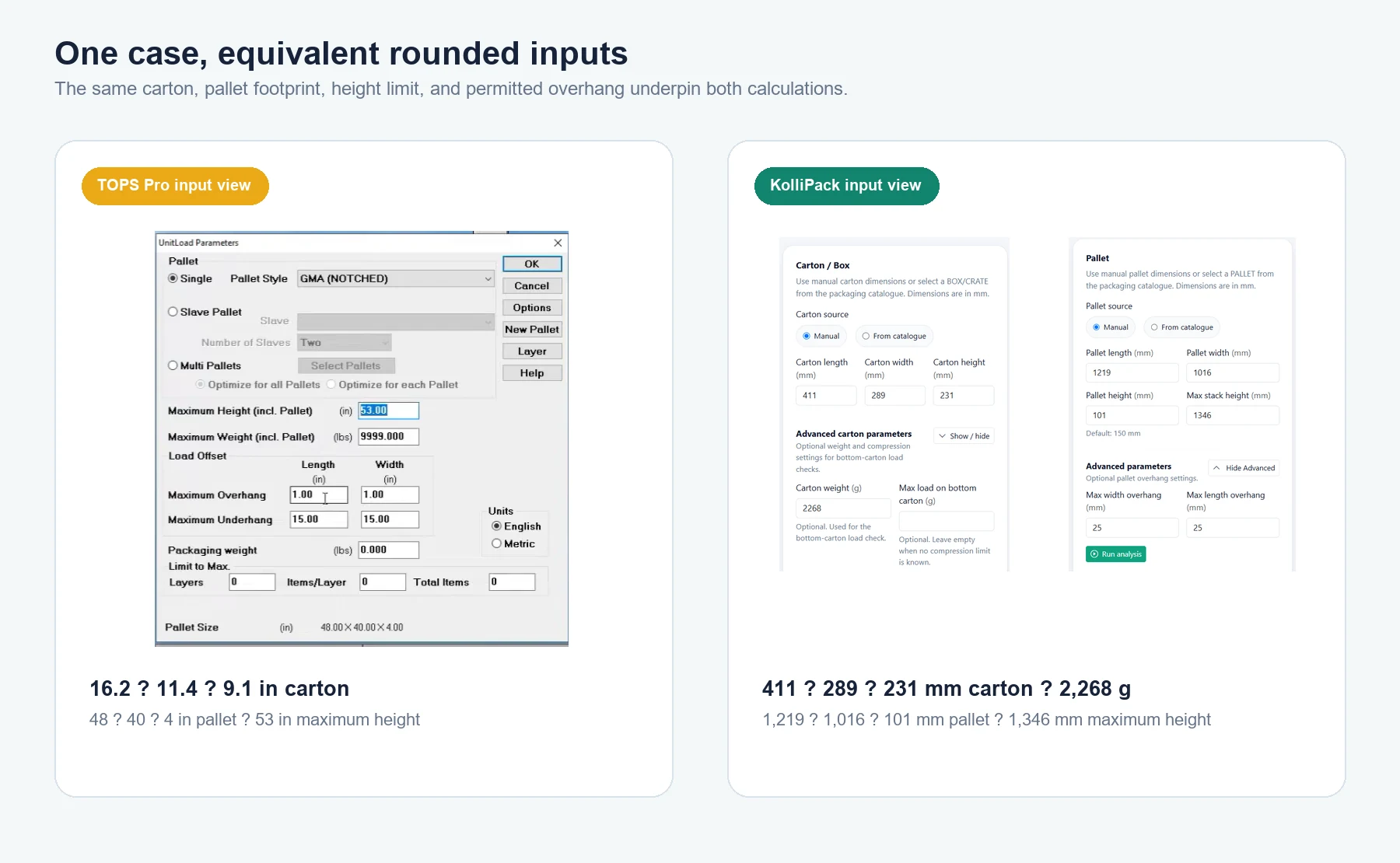
The carton and pallet conditions below describe the same physical benchmark. KolliPack uses rounded metric equivalents of the dimensions shown in the TOPS Pro tutorial.
| Parameter | TOPS Pro | KolliPack |
|---|---|---|
| Carton | 16.2 × 11.4 × 9.1 in | 411 × 289 × 231 mm |
| Carton weight | 5 lb | 2,268 g |
| Pallet | 48 × 40 × 4 in | 1,219 × 1,016 × 101 mm |
| Maximum total height | 53 in | 1,346 mm |
| Overhang | 1 × 1 in | 25 × 25 mm |
For a real packaging specification, dimensions should be confirmed against the approved carton drawing and the actual pallet. Here, the point is controlled comparison: each application receives the same usable footprint, height allowance, and carton geometry.
The same maximum: 50 cartons
The leading result matches cleanly: 50 cartons, arranged as 10 per layer for 5 layers. That is the first answer for pallet capacity, storage density, or outbound-load planning.
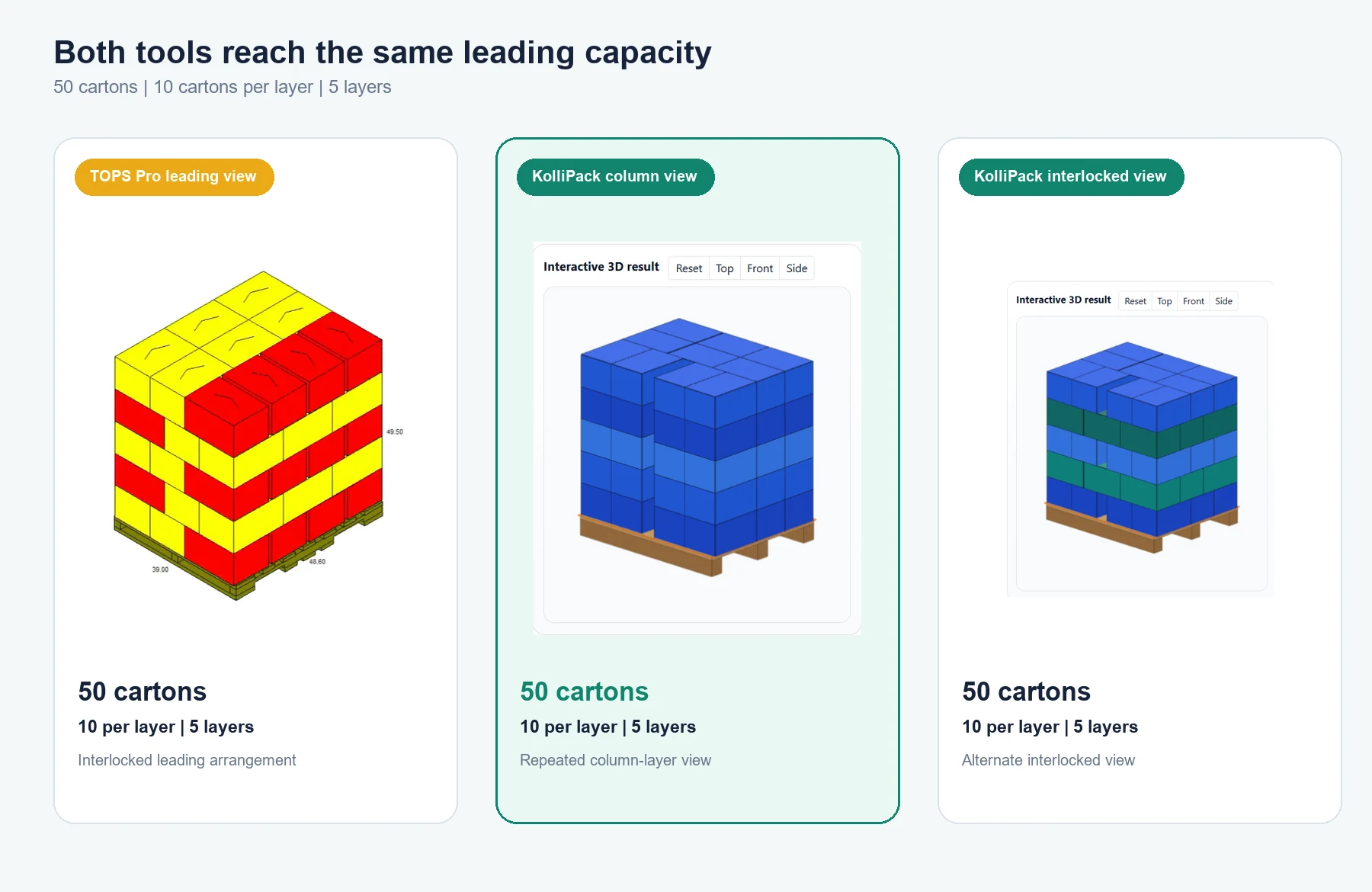
The images are not identical pattern diagrams, and they do not need to be. TOPS presents its leading load as an interlocked arrangement. KolliPack presents a repeated column layer and indicates when an alternate, interlocked layer is available. Both views are useful because they let a reviewer move beyond a single capacity number and inspect how the load is being represented.
Same best result, different search breadth
This is where the comparison becomes more useful than a simple tie. The supplied TOPS Pro table contains 14 candidate rows. KolliPack displays a shorter shortlist of 5 options. Both recover the 50-carton maximum, and both show leading 45-carton alternatives.
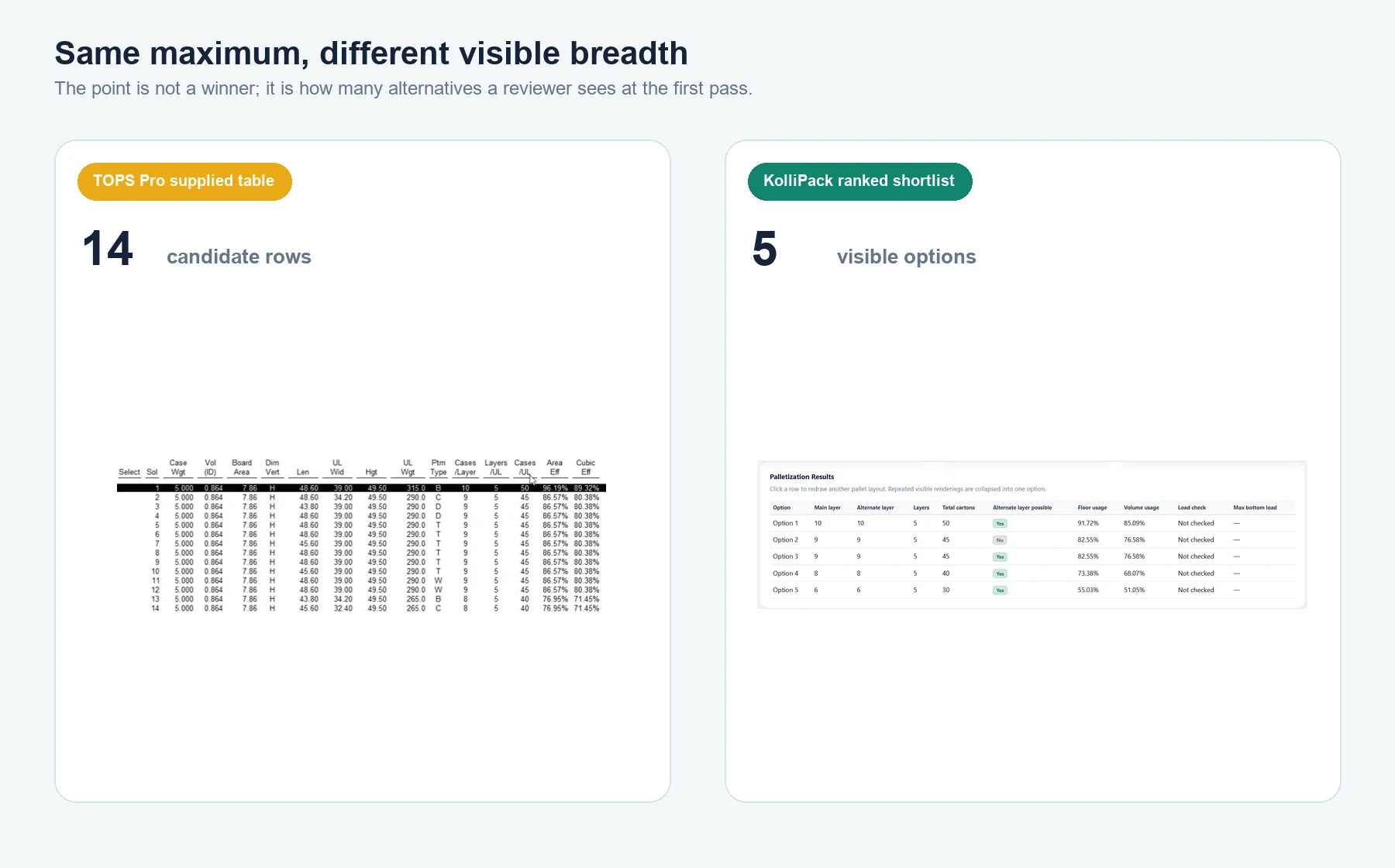
More variants can help when equipment, warehouse practice, or customer handling rules favor a particular arrangement. A shorter shortlist makes the first review faster.
Neither approach is automatically better. Candidate count is not a quality score. It is a prompt for the next question: which of the available patterns fits the carton, equipment, wrapping method, and handling process best?
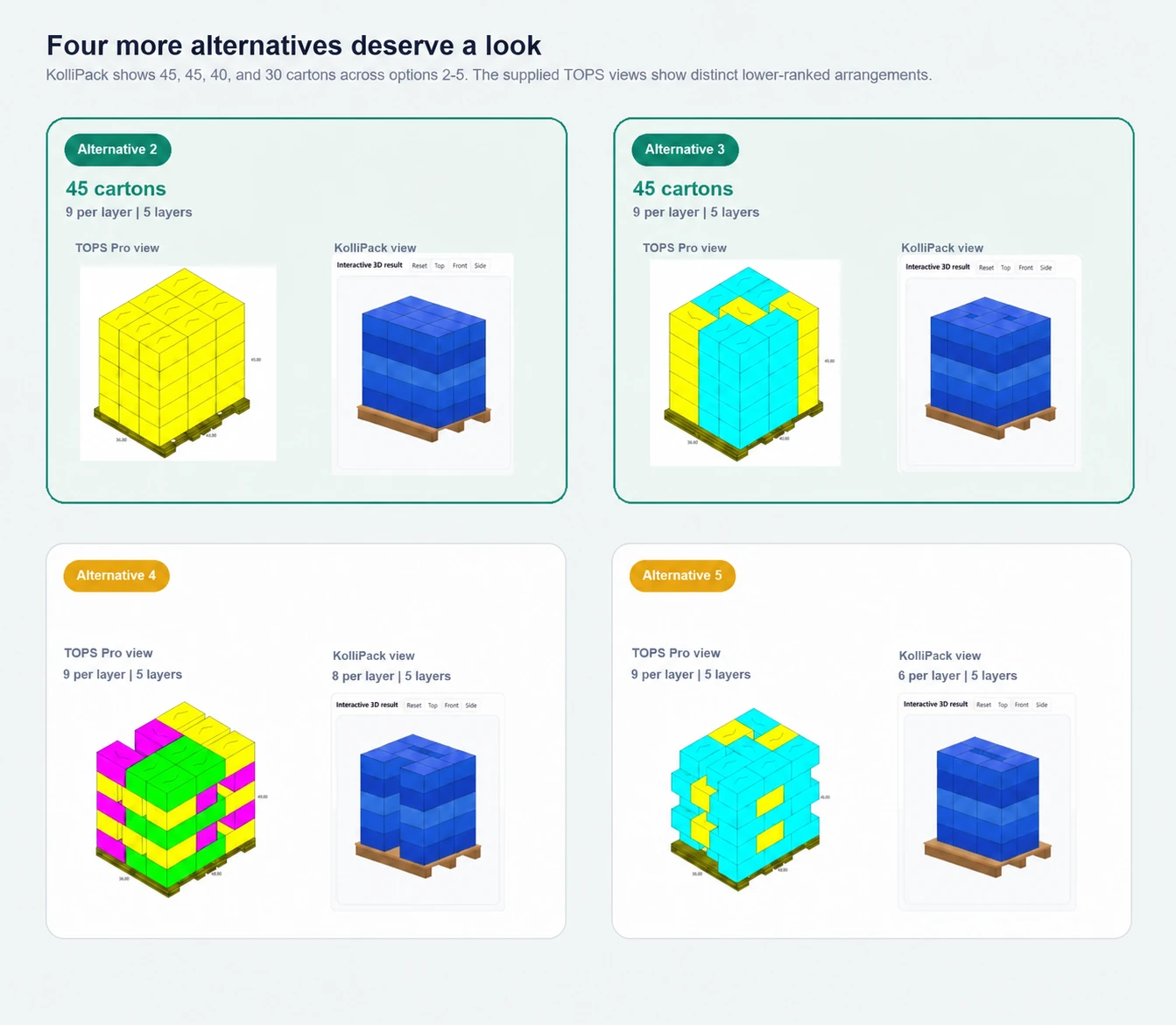
KolliPack makes that shortlist explicit. Option 2 (Block) and Option 3 (Centre-filled pinwheel) each carry 45 cartons, or 9 per layer. Option 4 (Hybrid pinwheel) carries 40 cartons, or 8 per layer, while Option 5 (Pinwheel) carries 30 cartons, or 6 per layer.
The last two cards are not direct pattern pairs. TOPS Pro Alternatives 4 and 5 each show 9 cartons per layer across 5 layers—45 cartons—while KolliPack Options 4 and 5 show 8 and 6 per layer. In this case, the TOPS Pro variants raise practical stability and handling questions. KolliPack's shortlist favors Brick, Row, Splitrow, Pinwheel, and Hybrid Pinwheel. Physical validation still decides the released pallet pattern.
The applications report utilization using their own conventions, so this article compares carton quantity, layers, and visible pattern alternatives rather than treating the percentages as equivalent.
Interlock is a decision, not a certificate
Column and interlocked patterns distribute carton contacts differently. That can affect how a pallet responds to wrapping, turns, vibration, compression, and manual or automated handling. But a geometry result alone does not certify a load for shipment.
The final choice still depends on carton strength, pallet condition, stretch-wrap or strapping practice, handling equipment, transport profile, and any customer or carrier requirements. The value of the comparison is not a stability verdict; it is a clearer starting point for the physical checks that matter after the geometry has narrowed the options.
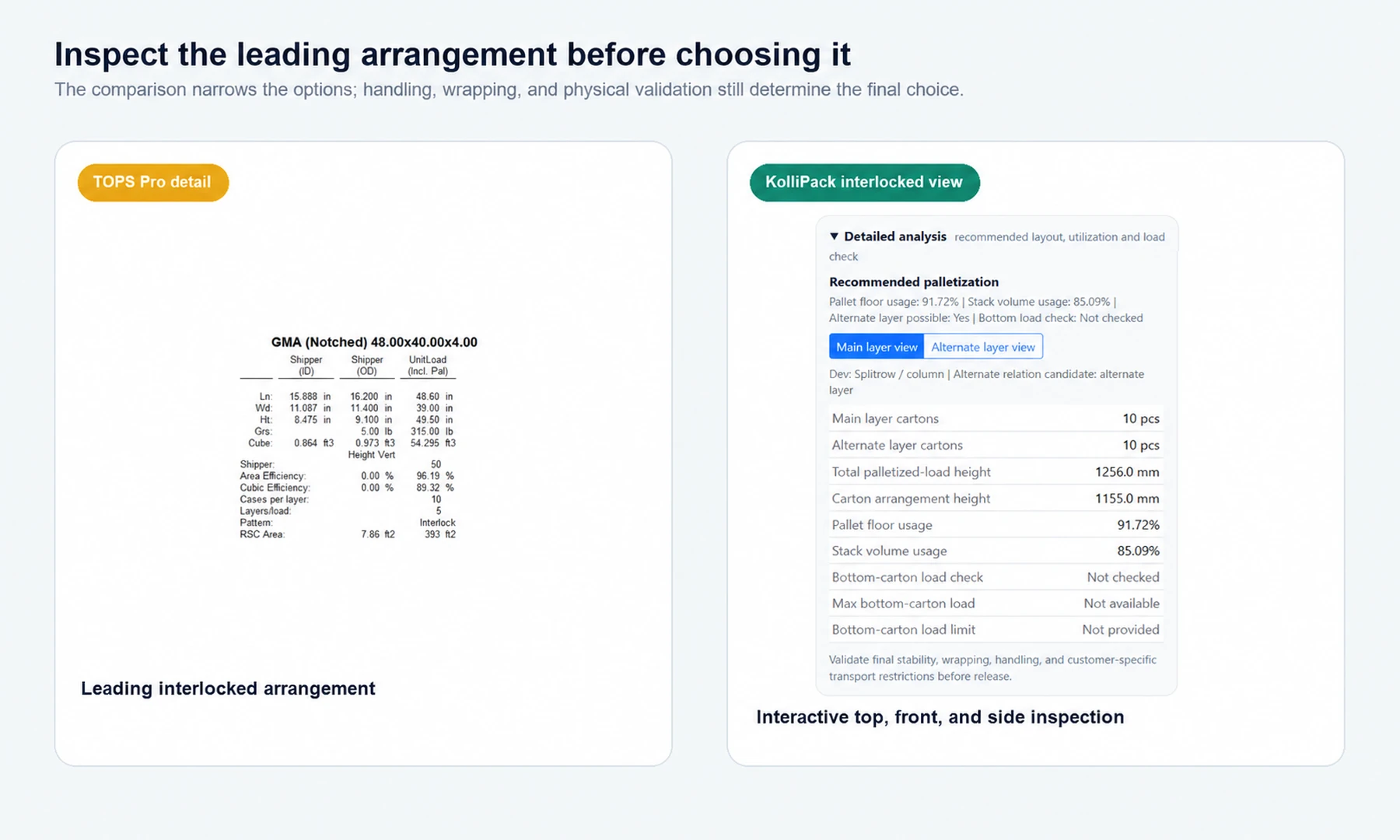
The two detail views are similar in purpose but different in vocabulary. Both describe the same leading case with 10 cartons per layer across 5 layers, and both expose layout information for review rather than certifying physical stability. TOPS presents the arrangement as an interlock and reports its own area and cubic efficiency measures. KolliPack separates the main and alternate layer views, reports 1,155 mm carton arrangement height and 1,256 mm total palletized-load height, and shows pallet floor usage of 91.72% and stack volume usage of 85.09%. It also makes the alternate-layer status visible and leaves the bottom-carton load check clearly marked “Not checked”. Those details make the review more operationally explicit, but the two applications’ percentages and labels should not be treated as like-for-like measures.
The report keeps the review portable
The KolliPack report records the case: carton and pallet dimensions, the selected 50-carton arrangement, the calculated 1,256 mm total height, and the ranked alternatives. It helps move a review into operations or test planning.
Both tools can export a report, but they give the reviewer different control over the output. KolliPack uses a standard report that brings together inputs, the pallet result, ranked patterns, detailed analysis, utilization, and a validation note. TOPS can customize how many metrics are included in the export, so the report can be made narrower or more detailed for a particular review. The supplied examples make that distinction visible: KolliPack emphasizes a consistent review record, while TOPS gives more control over the metric set.
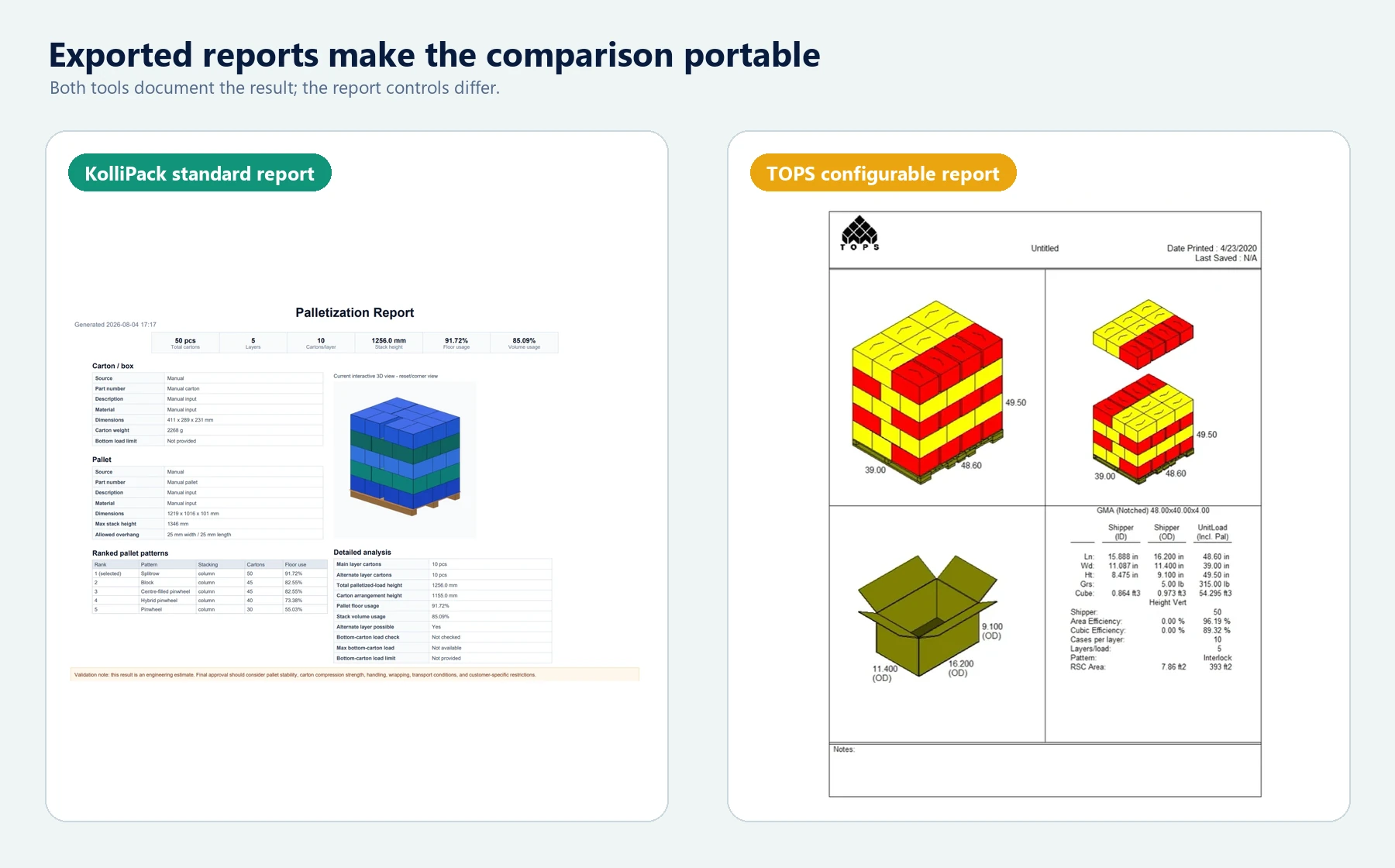
It remains a calculation record, not a release document. The report can make the chosen assumptions and geometry easier to review, while carton testing, load securing, and operational approval remain separate decisions.
What this benchmark shows
For this one case, KolliPack matched the best visible quantity from TOPS Pro: 50 cartons, 10 per layer, and 5 layers. TOPS Pro showed a broader set of supplied candidate rows. KolliPack offered a smaller interactive shortlist with column and interlock inspection for the leading arrangement.
That is a useful benchmark result, not proof of full product equivalence. A different carton, pallet footprint, height limit, or operational constraint may change both the best quantity and the pattern choices worth reviewing.
Open the pallet benchmark in KolliPack
Open the same pallet benchmark in KolliPack, compare the generated patterns, and switch between the column and interlocked views. You can then change the overhang or height limit and recalculate without losing the original benchmark starting point.
A balanced takeaway
The useful takeaway is simple: a shared maximum is only the beginning of a pallet decision. In this focused case, both tools reach 50 cartons; the practical work is deciding which visible arrangement deserves the next engineering and operational review.